cubeStop

cubeStop

cubeRandom

block

cubeStop

cubeStop

cubeStop
StatiCAD
StatiCAD
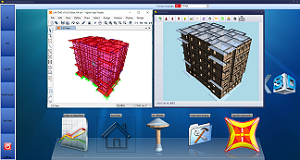
StatiCAD is a software that performs static analysis and project drawings of masonry-buildings according to earthquake regulations. There are 3 version types. The program has been translated into 104 languages.
| *NEW* StatiCAD Ultimate | *NEW* StatiCAD Hybrid | StatiCAD V9 Professional | StatiCAD V9 Standard |
 |
|
 |
 |
| Buy Annual Subscription | Buy Annual Subscription | Buy Now | Buy Now |
StatiCAD Product Editions
The program is offered in 7 editions. The feature differences are summarized in the table below.
| Feature | StatiCAD Ultimate | StatiCAD Hybrid | StatiCAD V9 Professional | StatiCAD V9 Standard | StatiCAD-Betonarme | StatiCAD V9 Pro | StatiCAD V9 Standard |
| Reinforced concrete building design | Yes | Yes | Yes | Yes | Yes | No | No |
| Timber building design | Yes | Yes | Yes | Yes | No | No | No |
| Masonry building design | Yes | Yes | Yes | Yes | No | Yes | Yes |
| Existing masonry performance analysis & retrofitting | Yes | Yes | Yes | No | No | Yes | No |
| AI Assistant | Yes | Yes | No | No | No | No | No |
| BIM / IFC import-export (IFC2x3) | Yes | Yes | No | No | No | No | No |
| License | Annual | Annual | Lifetime | Lifetime | Lifetime | Lifetime | Lifetime |
Quick and easy data access
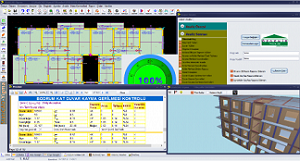
Drawn building on the screen can be viewed in three dimensions simultaneously with the graphical interface. The program is quite practical for use. For example , walls and bond beams are drawn at the same time and when the doors/windows created in the wall program automatically divides the wall into two parts, it automatically creates the horizontal bond beams on the doors and Windows; creates a piece of wall on the doors/windows and a piece of wall at the bottom of the wall. It can select and arrange multiple components. Modelling process of a building can be completed in 2-3 hours. Reports and drawings can be taken in a single analysis. StatiCAD has graphical interface for modelling building.
Complete and Advanced Structural Analysis
Program has many structural analysis options.
Program can, solve building system, make design calculations, generate reports, drawings with one click.
Program can use Eurocode8 or TBDY for determining earhquake forces with , modal analysis or equivalent earthquake load analysis.
Program can use finite elements method or classical methods for load distributions.
It can assigned masonry, reinforced concrete, steel, timber, conrete materials to elements.
Program can make strengthening of existing building with shotcrete-steel wire mesh or fibrous polymer wrap.
Program can make rebar calculations of beams and get drawings and calculation reports after analysis.
There is only axis dependence between ground floor and foundation. There is no other axis dependence between storeys. So nodes don't need to be one over the other for load transfer and static calculations. That provides program with great flexibility and enables it to model any type of masonry structures. The program uses analytical models or finite element method optionally. You can expect exact match between manual calculation and program at classic analysis. And very closer results to SAP2000 in finite element analysis. All calculations are made automatically in the program with one click. StatiCAD can perform the above operations without the need for an additional program, it also has additional features such as SAP2000 automation with shell elements, finite element analysis and response spectrum analysis.
If desired, the project is exported to the SAP2000 program and after the analysis is made, the results are automatically retrieved and the design calculations is made according to the finite element results of the SAP200 program. In this conditions you can use AS-1170-2007, UBC97, BOCA-96, NBCC-2015, ASCE7-16, IBC2012, NEHRP97,Chinese2010, IS 1893-2016, NZS 1170 2004, Italian NTC 2018, TCVN 9386-2012, KDS 41 17 00-2019, KBC 2016, Dominican Republic R-001 etc. for structural analysis and can use ACI 318-19, AS 3600-2018, BS8110 97, CSA A23.3-04, Eurocode2-2004, Hong Kong CP 2013, Indian IS 456-2000, Italian NTC 2008, KBC 2016,Mexican RCDF 2017, NZS 3101:2006, Singapore CP 65:99, SP63.13330.2012, TS500-2000 etc for concrete frame desing.
Program can optionally export model to SAP2000 and after analysis of SAP2000 and can import analysis results from SAP2000 (Including columns and beams reinforcement) and make design calculations and generate drawings and calculation reports.
StatiCAD is a continuously developed computer program preferred by more than a thousand users in masonry building since 2010.
New Reinforced Concrete Building Design
The program runs its analyses in line with the conditions prescribed by the 2018 earthquake code (TBDY2018) for reinforced concrete buildings. Depending on user choice, seismic forces can be obtained with the equivalent earthquake load method, the shear-frame modal method, or modal analysis with finite element matrices - with rigid, flexible, or no diaphragm. Buildings with rigid basements can also be solved. For shear walls, either a shell finite element or a frame finite element model can be used. Load transfer from slabs to beams can be done with shell finite elements (quadrilateral or triangular, regular or irregular Delaunay mesh) or with the classical method. Slab internal forces can be obtained from shell finite element results or, if preferred, from TS-500 approximate methods. The program's finite element and modal analysis results agree closely with SAP2000. For the verification calculation, please click here.
For foundations, continuous footing, beam-supported raft and beamless raft solutions are available. Soil-structure interactive analysis is performed. Polygon column analysis (for any cross-section geometry and reinforcement layout) is performed by biaxial iterative analysis or by two uniaxial iterative analyses depending on user choice, producing interaction diagrams and all checks. In polygon columns, the reinforcement layout can be determined automatically by the program or by the user.
For rectangular columns, biaxial iterative analytical solution, two uniaxial solutions, the Çakiroglu-Özer method, and the polygon section algorithm are all available.
Beam reinforcement is calculated for the double-reinforced case. Slab-induced torsion is calculated with high accuracy for the case where slabs contribute to system stiffness.
The program does not require any additional software for analysis or drawings. If desired, the building model can be exported to SAP2000 and analysed there per the Turkish Earthquake Code or any other code; from the SAP2000 design results, summary reports interpreted by StatiCAD and beam/column reinforcement drawings can be generated automatically. Alternatively, bi-directional automatic data transfer with SAP2000 can be used for model verification and testing.
Calculation reports are prepared in detail and in a clear, verifiable manner.
Reinforced concrete project drawings are produced side-by-side with a single click, freeing you from the labour of manually assembling sheets.
New Masonry Building Design
Optionally, the program automatically applies all formulas prescribed by the 2018 earthquake code and the 2019 risky-building regulation for masonry buildings.
TBDY 2018 has set out masonry analysis and calculation in great detail, making them practically infeasible by hand. With its advanced interface and analysis options, StatiCAD aims to solve your project as accurately as possible. Backed by years of experience, a mature program infrastructure, and more than 1,000 trusted users, it fills a significant gap in this field. Key strengths of the program include: equivalent-strut method, frame finite element method, modal analysis, equivalent earthquake load analysis, inclusion of slabs in system stiffness with shell finite elements, load transfer from slabs to walls and other elements via shell finite elements, confined masonry analysis (consideration of vertical tie-columns' contribution to wall strength and/or system stiffness), reinforced masonry wall analysis (assigning vertical and horizontal reinforcement inside brick walls per the 2018 code where unreinforced walls would not pass), and reinforced or unreinforced wall checks that take moment effects into account.
In masonry structures, wall axes, end nodes, thicknesses, eccentricities, and materials may vary from one storey to another. In StatiCAD, the program transfers loads between storeys without requiring axis or node-point dependency. This avoids the zero-compression-stress error often seen in other programs. The first version of the program was released in 2010 and development on masonry has been continuous since.
The program's main advantage over Excel-based calculations is the ability to transfer vertical loads between elements using the shell finite element method or the yield-line method. Excel sheets typically divide storey weight by wall lengths or areas to get average values, but actual load distributions vary widely with room and building geometry. Because wall shear capacity depends on the vertical load above it, walls with low vertical load have much lower shear capacity. A wall or building that "passes" with Excel-based averages can turn out insufficient once loads are distributed properly.
If there is an error in vertical load transfer or modelling, the program reports the error ratio after analysis and automatically corrects most modelling errors that may occur during analysis. The only axis dependency in the program is between the ground floor and the foundations; otherwise there is no axis dependency between storeys, so node points need not align between storeys for load transfer or static calculations. This gives the program great flexibility and allows almost any kind of masonry structure to be modelled.
Internally, the program can use the finite element method or the classical method. You can expect a one-to-one match between the program's calculation and a properly executed, detailed hand calculation.
All calculations prescribed by the regulations for masonry structures are performed automatically by the program.
New Timber Building Design
The program can calculate timber buildings in accordance with the 2018 earthquake code and the Principles for the Design, Calculation and Construction of Timber Buildings (ABTHYE), published in the Official Gazette on 24/03/2024 (No. 32499).
Timber shear walls (light-frame wall systems) are entered with the option of cladding on one side or both sides. Edge studs, intermediate studs, top plate, bottom plate, and intermediate ring beams are created. Timber slabs are entered as slab sheathing, slab joists, and horizontal intermediate ring beams. Independent timber beams and timber columns can be entered. Wind and snow loads are defined.
In analysis, the program automatically defines the 87 load combinations required by the regulation for timber buildings - accounting for vertical loads, earthquake loads, and snow loads - and automatically calculates seismic loads and element internal forces. For timber shear-wall elements, it automatically calculates shear capacity per TBDY2018 and reports the sufficiency status. Timber element calculations are performed per the strength-based design section of ABTHYE, including: tensile stress check parallel to grain, limit-state check under bending, lateral buckling limit state, compressive stress check parallel to grain, shear stress check parallel to grain, rolling shear stress check, torsion moment effect, combined effects (bending moment and axial forces), and compression perpendicular to grain - with moisture and size factors taken into account in the sufficiency checks.
Timber elements can be defined within a timber structural system as well as within other structural systems (masonry or reinforced concrete). Cross-section and deflection checks of beams can additionally be performed per the principles of TS 647 if desired.
Performance Analysis and Strengthening of Existing Masonry Buildings
In the program (Professional and Ultimate versions), masonry building strengthening calculations and drawings can be performed using steel mesh and shotcrete, fibrous polymer wrap, or the addition of new vertical tie-columns, shear walls, or walls. StatiCAD performs all operations without the need for any additional software. As an option, it also offers shell-element SAP2000-automated finite element analysis and response-spectrum analysis.
Internally, the program can use the finite element method or the classical method. You can expect a one-to-one match between the program's calculation and a properly executed, detailed hand calculation. If desired, the project can be exported to SAP2000; once the analysis is run, results are retrieved automatically and the design is finalised based on SAP2000's finite element results.
All calculations prescribed by the regulations for masonry structures are performed automatically by the program.
Historic / Traditional Structures and Structures with Curved Surfaces
Triangular or quadrilateral slabs/rafts with curved or circular edge(s) or surfaces can be modelled. Slabs in the form of domes, vaults, elliptical domes, helical stairs, Turkish triangles, circular slabs, curved slabs, or general 3D curved slabs (convex or concave) can be modelled. Arches can be created by rotating a concave curved slab around the X or Y axis.
After a quadrilateral slab is entered, the program creates node points (finite element joints) at the slab corners and at the midpoints of the slab edges; these points are also used as control points for curving the slab system. When the nodes at the edge midpoints are moved away from the average coordinate of the slab corners, the slab is curved so as to honour the edge midpoint positions. Depending on user choice, the slab surface can be meshed into shell finite elements as triangles or quadrilaterals.
After analysis, node-point displacements (UX, UY, UZ, Rx, Ry, Rz, U-total) are shown in the 3D view as contour lines for the requested load combination. For shell elements, internal forces (F11, F22, F12, M11, M22, M12) computed at the finite element centre, and stresses (Sigma11, Sigma22, Sigma12, Sigma Von Mises, Sigma Max, Sigma Min) on the lower or upper surface of the element, are displayed per storey in the 2D viewer, colour-coded by stress value. Loads from curved slabs are transferred to other structural elements automatically, and the building can be solved with a rigid diaphragm or as a flexible diaphragm taking slab stiffness into account. Curved slabs can be defined in reinforced concrete, masonry, and timber building systems.
AI Assistant and BIM/IFC
You can drive StatiCAD with a built-in AI assistant using natural language: create the model by typing or by speaking through the microphone, and get help drawing walls, columns, beams, slabs, axes, doors, windows, reinforcement and foundations, as well as with storey operations, analysis and reporting. The assistant can also evaluate files and images, works multilingually (it replies in the interface language), and for advanced use it enables terminal automation with tools such as Claude Code/Codex. The AI is positioned as an assistant, on the principle that the resulting model and results are reviewed by the responsible engineer.
For BIM workflows, the program imports and exports using the IFC (IFC2x3, Coordination View 2.0) standard. You can export your project to IFC in one step and share it with tools such as Revit, ArchiCAD, Tekla, Allplan or SAP2000, and import physical IFC models and SAP2000 structural analysis models into StatiCAD (frame members become columns/beams; surface members become walls, slabs and shell elements). Unit (m/cm) and character differences are handled automatically in the background. The AI and BIM/IFC features are available in the Hybrid and Ultimate versions (in the demo, IFC import is enabled and export is disabled).
Soluble Building Systems
StatiCAD can solve almost any masonry building that can be solved by Eurocode 6.
Orthogonal -Non Orthogonal building systems (horizontal, vertical, or inclined axis)
Structures with half basement
Stepped Structures
Regulations that can be used in buildings Analysis:
Eurocode 8:Design of structures for earthquake resistance
Eurocode 6:Design of masonry structures
RBTE2013:Principles of Building Risk Identification 2013
DBYBHY2007:Regulations of the Buildings to be Built in Seismic Zone 2007
StatiCAD is fully compatible with Regulations for masonry because it's exclusively developed for masonry buildings.
Usage Area of the Program
Urban Renewal review of existing buildings (Building Regulations and Earthquake Risk Regulation)
Performance Analysis and strengthening of existing masonry buildings
New masonry buildings design
Historic masonry buildings Performance Analysis and strengthening
Reported Outcomes
Pre-Analysis Reports
All of the data input parameters are given in the pre-analysis reports.
Postanalysis Reports
The analysis includes the calculations of the earthquake standards, geometry controls , load analysis , slab analysis , seismic loads calculation , shear center and center of mass calculations ,foundation subsoil stress , shear capacity , bending capacity , vertical stress and shear stress on the walls.
Strengthening Reports
Strengthened Jacket Shear Force , Strengthened Jacket Shear Capacity Controls , Strengthened Composite Wall Sliding Capacity Control
Performance Analysis Report
Calculation of the building performance level and risk situation, calculation of the risky buildings static/geometrical parameters , calculation of Strengthened condition and current situation , Risky building Management or Obtaining Results that Match the Criteria of Earthquake Management The program calculates and reports all of the static parameters required by the regulations of Eurocode 6 and Earthquake Management. There is no extra calculation needed after the program's calculation.
Drawing Output
Foundation application plan , wall plan , formwork plan , formwork plan sections , vertical bond beam details , foundation details , horizontal bond beam details , individual strengthening jacket details for each wall ( anchors , strengthening mesh , continuance reinforcement). Drawings can be exported in dwg/dxf format with scans, dimensions and layers without any shape loss.
Basic Features of StatiCAD
Easy to use and advanced graphics interface.
Overall structure analysis in one step and side by side Project drawnings** witn one touch
Structures with half basement / stepped buildings?? Calculations
Optionally , vertical bond beams can be considered as contributors to the seismic behavior of the building
strengthened and unstrengthened calculation reports and performance reports can be made with a single Project file.
strengthened jackets can contribute to the wall compression capacity
Determine specifid stiffness coeffcient for walls
Load factors can be changed manually for compressive stress controls and shear stress controls.
Instead of establishing reinforced concrete analogies , StatiCAD uses earthquake regulations.
Precisely determining vertical wall loads with 'yield line theory'' in vertical load analysis.
Compression and shear stress safety controls for the walls.
Different material properties can be entered for each wall , values can be taken automaticly from seismic regulations or, experimental values can be entered.
strengthening jacket reinforcement calculation strengthening drawing ( steel mesh, jacket drawning and anchor details in the wall section) With an advanced drawn editor like AutoCAD , you can edit the drawings and make them dwg without any loss.
Capable of giving offset value to the elements.
Importing the architectural project drawn in dwg or dxf format and automatically converting architectural lines to axles, walls, beams, foundations, doors, windows, vertical beams.
Ability to import the project in picture format into the drawing editor, pass over it with lines, and automatically convert lines to axles, walls, beams, foundations, doors, windows, vertical beams.
Transferring the project to the SAP2000 Program with all its features and loads, automatic SAP2000 analysis, automatic get of analysis results, creating a design report according to SAP2000 results.
Load transfers between floors independent of axles and nodes.
Even in the finite element model, vertical irregularities can be eliminated with the link elements placed by the program.
Reinforced masonry wall calculations and drawings in line with TBDY2018 calculation principles.
Adding a background image on the modeling screen (showing the scanned project, scaling, scrolling)
Vertical beam design in SAP2000 integrated analysis and verification calculation and report of the existing
Vertical beam application plan and vertical longitudinal expansion drawings
Reinforcement calculations and reports with Fibrous Polymer wrap on walls
Beam reinforcement calculation, opening drawings and reports
Structure-foundation interactive analysis
Foundation reinforcement calculation, opening drawings, reports in building foundation interactive analysis
Reinforced panel wall calculations and reports within the scope of TBDY2018
As element stiffness matrix for frame finite elements
Consider shear+bending in Wall Elements, only bending deformation in other elements
Consider shear+bending deformation in all elements
Consider only bending deformation in all elements
Defining polygon sections by giving corner points with or without gaps, Also parametric and rapid definition of L,T,O,I sections. Section parameters (Xg, Yg, Area, I2, I3, I23) related to defined polygon sections are calculated automatically.
Assigning defined polygon section to columns, beams and foundations
Defining timber, steel, reinforced concrete, concrete, masonry and other materials and their properties for column, wall, beam, foundation elements, choosing from the ready library list
Ability to use the elasticity modules, unit volume weights, moments of inertia, areas, shear strengths and compressive strengths of the defined polygon sections in analysis
and more...
System Requirements
The program works with USB Dongle. Program can be installed in any number of computers and it works when the dongle is plugged in.
The program runs on 32-byte and 64-byte Windows 7, Windows 8,Windows 10,Windows 11.
The program requires a USB port for Dongle.